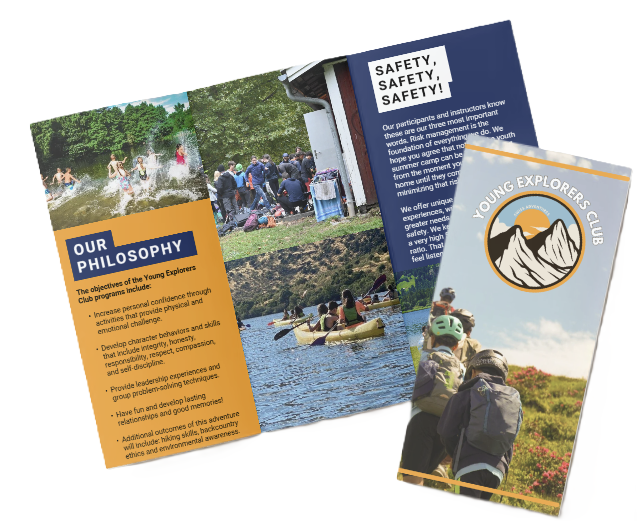

The Best Ways To Document Your Child’s Camp Experience
Document your child’s camp: photos, short videos & brief notes; set weekly targets, follow consent rules, remove geotags, and back up files.
Documenting Your Child’s Camp Experience
Overview
We document our child’s camp experience to preserve emotional milestones and visible skill growth. That means combining photos, short videos, and brief written or audio notes to capture expression, movement, and context.
Targets & Workflow
We set simple, repeatable targets — 50–200 photos weekly, a 3–5 minute highlight reel, and 3–8 line journal entries. Maintain a predictable workflow for naming, editing, and backing up files, and batch-edit weekly so we don’t get a backlog.
Privacy & Consent
Next, follow the camp’s consent and privacy rules and strip geotags before sharing. Obtain written consent when required and share via closed or invite-only albums.
File Management & Backups
Name files consistently, add searchable metadata, and follow the 3-2-1 backup rule (3 copies, 2 media types, 1 offsite).
Keepsakes
Turn highlights into keepsakes: export 1080p reels, create photobooks within 1–3 months, and compile annual progression albums.
Key Takeaways
- Hybrid approach: Use photos, 5–15s video clips, and short written or voice notes to capture tone, action, and memories.
- Measurable goals: Set weekly photo counts, a 3–5 minute reel, and short journal entries; batch-edit weekly to avoid backlog.
- Consent & privacy: Obtain written consent, follow the camp’s photo policy, remove geotags, and share via closed or invite-only albums.
- Consistent file naming: Add searchable metadata and follow the 3-2-1 backup rule (3 copies, 2 media types, 1 offsite).
- Keepsakes: Export 1080p reels, create photobooks within 1–3 months, and compile annual progression albums.
https://youtu.be/3zuB-YMjPmI
Why Document Camp? The case, key stats and what to aim for
We, at the young explorers club, treat documenting camp as both a practical and emotional investment. About 14 million children attend summer camps annually (ACA). Roughly 85% of adults own smartphones (Pew), so capturing camp moments is within reach for most families. For further ideas on turning shots into lasting keepsakes see creating lasting memories.
Emotional and developmental value
Camp memories act as anchors for friendships, new skills and moments of confidence. Parents want keepsakes that show social wins and skill progress. I recommend a mix of photos, short videos and a few written notes. That combo preserves tone, voice and context in ways a single medium can’t. Photos freeze expressions. Videos capture laughter and movement. Journals catch thoughts that kids might forget. Together they let families track childhood milestones and visible camp growth across sessions of summer camp, overnight camp or day camp.
Measurable targets and practical workflow
Aim for simple, repeatable goals so documentation doesn’t become a chore. Here are targets we use and recommend:
- Weekly photo range: 50–200 images. That gives variety without overload.
- Weekly highlight reel: 3–5 minutes of edited video, stitched from short clips and key audio.
- Weekly caption or journal entry: 3–8 lines noting a skill learned or a new friend.
- One social milestone captured per week: e.g., first canoe, first stage performance, or a confidence moment.
- Quarterly or yearly output: compile weekly highlights into a photobook or yearly progression album to show camp growth.
Keep the workflow tight:
- Shoot with smartphone on high-efficiency settings.
- Capture short clips (5–15 seconds).
- Add a quick voice note for context.
- Batch-edit once a week to avoid backlog.
- Back up each week’s folder to the cloud and a local drive.
- Involve your child in selecting images; that builds ownership and yields authentic captions about childhood milestones.
https://youtu.be/MO0jS3NJzys
Plan Before You Pack: permissions, goals and safe sharing
We, at the young explorers club, always start by checking the camper handbook for the camp’s photo/video policy before bringing a camera or posting anything. Read the rules for phones, group shots and social media use. Set a clear documentation goal up front — that focus keeps you compliant and intentional. Examples of goals I recommend are daily quick highlights, an end-of-session slideshow, or a physical scrapbook for family.
Consent and permissions
I advise you to get written permission before sharing images that include other campers. Group photos are especially sensitive; ask the camp director or office for their policy and any required release forms. If you plan to post publicly, obtain parental releases for every child visible. We also suggest coordinating with counselors — they’ll often help confirm which kids are cleared to appear in off-site albums and can add stamped or dated notes when needed.
Use private sharing practices to protect kids and locations. Keep albums closed or invite-only. Avoid live geotags, public captions that reveal real-time location, or posting exact cabin names. If you want to share to a small circle, use a private album and limit membership to family and close friends.
Parent checklist
Below is a compact checklist to run through before you shoot or share images.
- Read the camper handbook for photo/video rules.
- Ask the camp director about official group-photo policies.
- Obtain parental releases for any other campers you might post.
- Request counselor cooperation for stamped/dated notes where possible.
- Use closed albums or invite-only groups for sharing.
- Remove geotags and disable location services before uploading.
Sample request language: “Hi — I’d like to share some photos of our child from camp in a private album for family and close friends. Are there any camp rules or permissions I should obtain? Would you be able to confirm whether group photos are permitted to be shared off-site?”
Pre-post checklist
Before you hit upload, confirm written consent for everyone in the frame. Remove all geotags and crop or blur out children you don’t have permission to post. Set strict privacy controls — closed album, invite-only membership, and no public captions. When you’re unsure about a shot, ask the camp or the other parents, or save it for a private family-only archive. For extra prep tips, see the ultimate checklist.

Capture: Photo and Video Strategies (counts, gear, composition, storage)
We, at the young explorers club, set realistic targets so parents and staff don’t get overwhelmed. A week-long day camp usually yields 50–200 photos. Multi-week overnight camps commonly produce 200–800+ photos depending on activities and variety.
Counts, composition and file workflow
Set clear daily goals: aim for 10–20 short clips (5–15 s each) and 1–2 longer clips (5–15 minutes) for key events. For stills, prioritize faces, candid moments and a few posed portraits. Get down to the child’s eye level for stronger shots. Use burst mode for action. Avoid backlit faces; use a fill flash sparingly if you must. Favor golden hour for soft light on faces.
File size planning keeps you honest. Typical smartphone JPEG (12MP) runs about 3–6 MB per photo. DSLR RAW files commonly sit in the 20–50 MB range. For video, 1080p @30fps H.264 averages roughly 7–8 GB per hour. 4K @30fps H.264/H.265 jumps to about 20–25 GB per hour. Choose 1080p as a solid default; pick 4K only if you want future-proofed footage and you can handle the storage and editing. Record in MP4 with H.264/H.265 for broad compatibility.
Name and tag files as you go so you can find highlights fast. Use a predictable pattern like CampName_Day3_Canoe_Clip01 or CampName_Day5_Firepit_Photo03. Transfer files nightly to a laptop or portable SSD and keep at least one backup copy off-device. We recommend duplicating footage before you format cards. Format SD cards in-camera before first use.
Gear, prep and supplies
Below are the essentials we pack depending on goals and conditions:
- Smartphone for everyday candid photos and quick uploads.
- Action camera (GoPro, DJI Action) for water, zip lines and rough play.
- Compact mirrorless or DSLR for portraits and low-light situations.
- Instant camera (Fujifilm Instax, Polaroid) for tangible keepsakes and on-the-spot gifts.
- At least one 64–128 GB SD card per camera as a minimum; have backups.
- Power bank, spare batteries and a compact charger.
- A small microfiber cloth, protective case, and a basic mini tripod or hand grip.
Practical tips: keep all cards labeled and stored in a protective case. Rotate cards—use one while the others are stored cold, dry and safe. We format cards in the camera before first use and again after backups are verified.
Editing and highlight reels
Build a highlight reel from short clips and a few longer moments. Aim for a 2–5 minute reel to keep attention. Use short clips (5–30 s) to tell the story, and intersperse 5–15 minute event clips for big moments like talent shows or canoe races. Export the final reel as MP4 H.264 for easy sharing. If you shot in 4K, downscale to 1080p for fast sharing and smaller files unless you want a higher-resolution master.
On the practical side, keeping a predictable daily rhythm helps capture consistent material—see a day in the life for an example of how we structure shooting windows.

Record: Journals, Letters & Audio — prompts, tools and time budget
We, at the Young Explorers Club, recommend simple, repeatable rituals that fit into a camper’s day. Short habits beat sporadic epics. Aim for consistency: 3–10 minutes daily or a 15–30 minute weekly summary. Those brackets keep documentation realistic and meaningful.
Daily prompts and time budget
Use this compact routine to capture a week of memories without overwhelming kids or counselors. Try one of these rhythms and stick to it.
- 3–5 minute end-of-day bullet entry: one sentence for mood, one sentence for a highlight, and one sentence for a question to answer tomorrow.
- 7–10 minute prompted page on alternate days: answer two prompted questions and add one drawing or sticker.
- 15–30 minute weekly recap: combine 2-minute voice memos from several nights into one written entry.
- Quick counselor note: a dated, sealed sentence about a milestone to open at home.
- Two-minute bedtime voice memo: the camper records thoughts or a story; we transcribe later.
Sample prompts to hand to campers:
- “Today I learned…”
- “My favorite part…”
- “Something new I tried…”
- “Who I played with today…”
- “One thing that surprised me…”
Keep the prompts short and repeatable. Kids relax when they know the script. Counselors can prompt answers during cabins or before lights-out.
Tools, workflows and counselor notes
We prefer a hybrid approach: simple paper for tactile kids and streamlined digital tools for parents who want searchable archives. Good physical choices are Moleskine or Field Notes. For repeatable, eco-friendly pages pick Rocketbook. For digital-first families use Day One, Evernote or Google Keep. For audio transcription, Otter.ai turns 2-minute voice memos into editable text you can paste into Day One. That combination—voice memo → Otter.ai transcript → Day One entry—creates a polished, time-efficient record.
Practical workflow we use: counselors prompt the camper at lights-out for a 60–120 second voice memo. They upload the file to a camp account or parent folder. We run the audio through Otter.ai, clean the transcript, then paste it into Day One as the dated entry with a photo or a scanned drawing. That process takes under 10 minutes per child weekly if you batch uploads.
For younger children we encourage drawings with dictated captions. Have counselors write a one-line caption as the child dictates, then seal and date that note in camper mail. Ask counselors to include a brief, dated sentence about milestones or a funny moment; those sealed notes become treasured “camp letters” at home.
We, at the Young Explorers Club, recommend labeling every item with date and who recorded it. Encourage parents to request a weekly compiled export from Day One or a photocopy bundle from the counselor team. If you want ideas for how memories look after camp, see our piece on camp journal practices for inspiration.

Organize & Back Up: file naming, metadata, apps and the 3-2-1 rule
We at the Young Explorers Club keep files simple and predictable so parents can find any moment fast. Use this exact filename template for every photo: CampName_Year_Day_Event_##.jpg. Pair names with a clear folder tree: /Camp/Year/Week/Day/Event. That structure maps to schedules and makes batch processing painless.
File naming, folders and metadata
Add EXIF-aware metadata immediately after import. Use Adobe Lightroom or Photo Mechanic to bulk-apply keywords like camper name, activity, friends and date. Keep geotagging off by default; enable it only when locations are safe to share. Attach short captions or voice notes and transcriptions — Otter.ai works well — to preserve context for photobooks and edits. Check that keywords are embedded into each file’s metadata so prints and exports retain searchable tags.
Backup strategy and apps
Follow the 3-2-1 backup rule: keep 3 copies, on 2 different media, with 1 copy stored offsite. For practical setup we recommend this combination:
- Primary: auto-backup to Google Photos or iCloud Photos (set uploads to Wi‑Fi only).
- Secondary: local copy on an external HDD, rotated and stored offsite when possible.
- Offsite: a third copy in a different cloud or a physically separate drive.
Implement these steps each camp week:
- Enable daily auto-upload for active capture periods; switch to weekly backups if you’re shooting less.
- Export top images weekly to a separate /Highlights or /Archive folder.
- Verify backups weekly by opening files and thumbnails on both cloud and local copies.
- Perform a manual full archive at the end of camp or monthly during long sessions.
We recommend these apps and services for each task:
- Cloud backup: Google Photos, iCloud Photos, Amazon Photos, Dropbox.
- Editing and metadata: Adobe Lightroom, Snapseed, Photo Mechanic.
- Video edits: iMovie, Adobe Premiere Rush, InShot, CapCut.
- Printing and photobooks: Shutterfly, Mixbook, Chatbooks, Snapfish, Artifact Uprising.
For verification, open several random files after transfer and confirm EXIF and thumbnail presence. If a file won’t load, re-copy the original and re-run the checksum or comparison. Keep a short log of each backup session so you can trace when and where copies were made.
Link camp memories and logistics with resources like creating lasting memories to help parents visualize the final photobooks and prints.

Keepsakes, Projects & Timelines — what to make and when
We, at the Young Explorers Club, treat camp documentation as both a practical archive and a gift. I focus on small, repeatable projects that capture energy in the moment and scale into long-term albums. I recommend starting capture on day one and finishing assembly while memories are fresh; this keeps choices simple and deadlines realistic. For a sense of a camper’s daily rhythm see a day in the life.
Projects, timelines and concrete workflows
Short-term projects (finish during or within 1 week)
- Weekly highlight reel: 3–5 minutes, use 15–30 clips; export at 1080p for easy sharing.
- “Top 10 Moments” collage: single-page print or social image for a quick keepsake.
Mid-term projects (1–3 months post-camp)
- End-of-camp photobook: 20–60 pages; aim for 40 pages for a week-long camp.
- Printed poster or framed photo from a standout image.
Long-term projects (annual)
- Annual camp yearbook compiling each year’s photobooks.
- Progression albums across multiple years to show growth.
- Labeled digital archive organized by year and camp session.
Recommended assembly timeline
- Assemble scrapbooks and photobooks within 1–3 months after camp while memories are fresh.
- Create the highlight video at week’s end and export two versions: high-res for archiving and low-res for sharing.
Example one-week workflow (practical steps)
- Capture daily.
- Pick 15–25 best photos per day → ~150 total for the week.
- Edit and sequence clips → 3–5 minute highlight video at week’s end.
- Build a 40-page photobook from the top ~150 images within one month.
Keepsake handling (simple catalog method)
- Catalog and scan badges, name-tags, small crafts.
- Photograph oversized items like tents or large art pieces.
- Create a keepsake log that records: item, date, who gave it and a one-line note.
Print services and products to consider
- Shutterfly for standard photobooks.
- Mixbook for creative, customizable layouts.
- Chatbooks for quick, inexpensive books.
- Project Life for physical scrapbooking kits.
- Fujifilm Instax for instant prints at camp events.
Measurable content-budget example (planning numbers)
- One week at 200 photos @ ~4 MB/photo ≈ 800 MB photo storage.
- Plus ~2 hours of 1080p video ≈ 16 GB.
- Use these as rough estimates to pick storage plans and transfer workflows.
Recommended deliverables and sizes
- Weekly highlight reel: 3–5 minutes (1080p).
- Photobook: 20–60 pages (40 pages ideal for one week).
- Annual progression album: compile each year’s photobooks into a single volume.
Sources
American Camp Association — Camp Industry Trends & Statistics
Pew Research Center — Mobile Fact Sheet
Pew Research Center — Social Media Use in 2021
Google Photos Help — Back up & sync
FUJIFILM instax — Cameras & Film